What’s new in Indent, most recent first.
August 3–9, 2026
Publish reports
You can now ask Indent to publish a report when the result of an automation or session needs a durable document. Reports have their own section in the app, and you can leave feedback by selecting text within a report.
In Slack, reports are shared as a Slack canvas. Existing Slack connections must reconnect to grant canvas access.

Control which branches get automatic reviews
Under Settings → Code Review, you can now limit
automatic reviews to pull requests targeting the default branch. You can also add source branch
patterns that Indent should skip. Explicitly request a review by tagging @indent to override these
rules.

Set organization defaults
Organization admins can now choose a default environment and model under Settings → Organization Defaults. New sessions use these defaults when no environment or model was selected explicitly.

See automation usage
Each automation now has a Usage tab with month-to-date spend, a daily cost chart, the average cost per run, and its most expensive sessions.

Improvements
- The Review tab is now available to every viewer in a session. It shows working changes and pull request changes side by side without leaving the session.
- The desktop app now shows Browser and Processes tabs for cloud sessions.
- You can ask Indent to use a specific supported model for an automation. Automations default to the organization or platform default model.
- Automation runs can be titled according to standing guidance, such as copying an alert name and dropping timestamps or IDs.
- Reports load more results as you scroll, keep filters while you navigate, and show which session published each version.
- Settings now has mobile navigation.
Fixes
- Report ZIP exports bypass stale browser caches, and invalid or blank report IDs produce a clear error.
- Slack report links show the report title and link back to the report in Indent.
- The Review file tree keeps long directory names readable and no longer resets while a session writes files.
- The environment setup page no longer reports an absent build as still building.
- Empty thinking and assistant rows no longer appear in session transcripts.
July 27–August 2, 2026
Hand a Linear issue to Indent
You can now delegate a Linear issue to Indent, name it in an issue description, or @-mention it in a comment, and Indent opens a session and works the ticket from inside Linear, attributing the work to the ticket’s owner. Indent reports its work back to Linear and can ask for clarifications with a link back to answer in Indent.
To get started using Indent from Linear, connect Linear at organization scope from Linear in Integrations.

Autofix on every code review
When code review finds an issue that it can immediately fix, the review comment now carries an Autofix link on the finding itself, a link per failing check, and an Autofix All link that batches them.

Set up an automation from Slack, and see what every run returned
Ask for an automation from inside the Slack channel you want it in, with
@indent /automate draft the weekly changelog, and Indent opens a session that works the job out
with you instead of saving your one-line description as the whole instruction. Indent runs the task
once end to end before saving the automation.
An automation can also report back from each run. Ask it to track a few values, such as a count, a status, or a link, and they become columns on the automation’s Sessions tab, one row per run, updating live as runs start and finish.

Archive a session
Sessions you’re done with can be archived from the home page, the sidebar, or the session itself. Archiving stops a session that’s still working, takes it out of your lists, and keeps everything: the link still opens it, and you can unarchive it from the Archive tab on Home. The same menu now carries Copy link and Open in web / Open in desktop app, so moving a session between the browser and the desktop app is one click.

Improvements
- Pull request reviews are more efficient, with better handling of force-pushes, replies, and additional commits. @-mentioning Indent on a pull request it has never touched will now start a review.
- Admins can invite teammates from Settings → Members.
- Questions Indent asks in a session are now part of the transcript: you can review questions and answers, and reopen the answer panel if you dismissed it.
- Better support for long pasted snippets and long messages in the session view.
- Queued messages can be expanded.
- Memory shows the path of the file you’re reading.
- The Code Review page opens with a repository already selected, and the selection lives in the URL so the view is shareable.
- Each session in the sidebar shows how long ago it was active.
- Streamlined home page display of sessions.
- Better mobile navigation.
- Existing connections are visible and marked as configured in the catalog, instead of disappearing.
- Skill steps in the transcript show the skill’s name and expand to its instructions.
- Better connections for LaunchDarkly, MotherDuck, and Ramp.
- Datadog connections can now create and update dashboards (reconnect to update your existing connection).
- Better instructions for connection forms.
- Indent now surfaces missing permissions in existing connections.
- Better loading and rendering for Terminal, Browser and Processes panels.
Fixes
- Mentioning Indent in a Slack thread reply that is also sent to the channel now works.
- Indent no longer reads its own Slack replies back.
- Slack @-mentions show as user names instead of user IDs.
- Long command output is no longer silently truncated.
- Fixes for Indent’s code search.
- Commands killed by the system are reported as killed, so Indent can correctly identify out of memory errors.
- Oversized tool results and screenshots can no longer wedge sessions permanently.
- A memory spike in one process on a sandbox no longer takes down everything else running on it.
- Fixes for stalled sessions.
- Any session may now be archived.
- Automations check their environment when they are saved.
- Subagents no longer rename sessions.
July 20–26, 2026
Automations can now run on a schedule
Automations are no longer limited to watching a Slack channel. You can now give one a schedule, every day, every week, or any cron expression you like, pick the timezone it runs in, and choose whether the result gets posted to a Slack channel or kept inside Indent. Scheduled automations are available to every organization, and each run shows up in the automation’s Sessions tab.
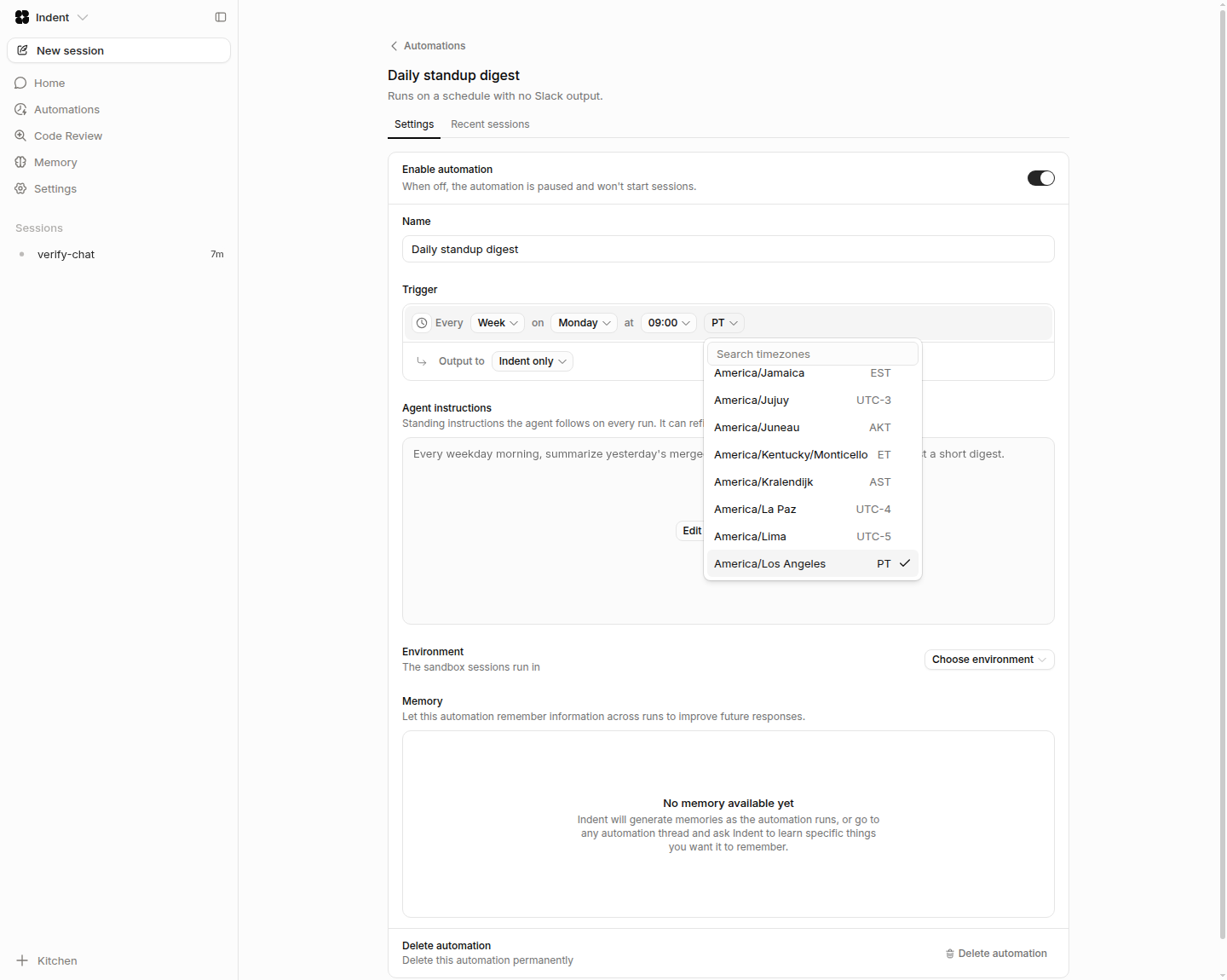
The automations screen was rebuilt around this: a searchable list that shows each automation’s trigger at a glance, a dedicated editor for the standing instructions Indent follows on every run, and per-automation memory.

When a scheduled automation starts, Indent posts a short notice in Slack under the automation’s own name, with its own clock avatar so different schedules are easy to tell apart. The run’s replies land in that thread, and mentioning Indent there continues the same run instead of starting a new session.
Channel automations also got finer control over what they react to: a bot posting, a person posting, either, or only messages that tag Indent. You can also ask Indent in a session to list, create or change your automations instead of filling in the form yourself.
Spending controls for code review
Code Review settings now take a maximum cost per pull request, per repository. When a pull request reaches the ceiling, Indent stops reviewing new pushes and posts a notice explaining that the review is paused. You can authorize one more round from the link in that notice or by replying to Indent on the pull request, and that round reviews the current head commit with current CI results rather than a stale snapshot. Leaving the field blank keeps reviews unlimited, which is what existing repositories get.
Reviews now also pause when billing blocks them, either out of credit or at an organization spending limit, with a comment saying so and a link to billing.
Choose how often Indent reviews a pull request
Each repository can now be set to review every push (the existing behavior) or only the first time a pull request opens. In first-review-only mode Indent posts its first review and then leaves the pull request alone. Later pushes, CI runs, comments and labels don’t start another round, and the review comment carries a link to request one when you want it. Review comments also say what triggered each round and which commit was reviewed.
Organization-wide spending limit
Billing settings now include a monthly spending limit for the whole organization: admins can set it, change it, or clear it, and work stops for everyone once it is reached. The pre-filled default is $1,000 (was $100), and the older per-user caps are gone in favor of this single control. Automatic credit reloads now trigger when your balance drops below $10 rather than $5. Saved values are untouched.
The daily usage chart separates spend into automations, pull request reviews and sessions, with a total per day in the tooltip. Spend from nested background work is now attributed to the activity that started it, so a review or an automation shows its true cost instead of leaking into the general sessions bucket.
A home page for everything in flight
Indent now opens onto a live home page listing every session you and your team have going, with search, Sessions / Team / Archive tabs, and private-only and local/cloud filters. The filters live in the URL, so a view is shareable and the back button works. Each row shows status, participants, elapsed time, the Slack channel a session came from, and a hover summary of the pull requests it opened or merged. A composer on the page starts a new session without leaving it.
Setup for people joining an organization that already exists
Someone invited into an organization that is already configured now gets a short setup flow of their own, connect GitHub and then connect Slack, instead of being dropped straight into the app or re-running the whole organization setup. Anyone already using Indent is unaffected.
A new default model
New sessions everywhere, in the app, Slack, GitHub and code review, now default to Claude Opus 5.
Documentation site
Documentation moved to a new home at docs.indent.com, with sidebar navigation, per-page contents, full-text search, and a plain-Markdown version of every page for agents to read. Product content is still thin: this week shipped the site itself plus an overview and a placeholder quick start.
Improvements
- When Indent asks you a multiple-choice question, picking an option submits it instead of waiting for a separate send, and its replies stream in as they are written rather than landing all at once.
- Standing instructions for an automation can be about twice as long as before, and instruction and memory previews render as formatted text instead of raw markup.
- The desktop app has its own settings page showing the installed version and update controls, Cmd+N
opens a new session, and
indent://links and the session menu open sessions directly in the app. - Browser access from the desktop app now runs over Chrome’s own extension channel, with a card in desktop settings telling you whether the browser is connected. You grant or revoke control of a single window from the extension icon, and controlled tabs sit in their own Indent tab group.
- Environments: you can trigger a verification run from the setup screen, and a machine boots automatically if none is running. The Verify step only appears once there is something to verify and stays disabled until a build has succeeded.
- Light/dark theme now has a follow-system option, and it is available from the settings menu.
- New integrations: Grafana Cloud, Plain and Vanta. Editing a connected server is now an explicit edit mode over a single draft, covering sign-in method, address and credentials, with Test connection, Cancel and Save changes, and admins can delete a custom server definition outright rather than only disconnecting it. Indent also keeps a synced snapshot of each server’s tools, so tool lists load instantly and a slow server no longer hides them.
- Indent now reads the skill files checked into your connected repositories and keeps them current in the background, so a session knows a repository’s skills without scanning the checkout.
- The built-in terminal’s colors were retuned to match the app instead of pure black.
- When an MCP server fails, Indent tells you what the server actually returned instead of a generic failure.
- Markdown files in the file sidebar render formatted by default with a toggle for the raw source, memory files link to each other so you can browse them like a small wiki, and the memory you are viewing is part of the URL.
- Replying in an Indent Slack thread without @-mentioning gets a one-time nudge, so a message that Indent will not see does not just sit there. Slack messages from people without an Indent account are held and released once they sign in, and organizations with domain auto-join get accounts created for Slack senders automatically.
- On GitHub, Indent no longer treats every comment as something it must answer, only ones that @-mention it.
- CI status updates sent into a session now list only the failed checks.
Fixes
- Bash command output stays visible while a command runs and is replaced by the saved output when it finishes, instead of sticking on “Running…”.
- A review’s working notes now carry forward across pushes instead of restarting from scratch on every commit.
- Replying inline to one of Indent’s review comments works again without re-mentioning it.
- Indent reliably ends its turn after sending a final reply instead of carrying on working.
- A tool result Indent could no longer parse used to make the session unusable; it now recovers.
- Stopping a session now actually stops the command running on the computer.
- A local computer whose credential expired now refreshes it instead of reconnecting forever.
- Sessions resume correctly after an interrupted response instead of stalling.
- Long activity labels no longer overflow the live activity row.
- Model errors coming from the upstream provider are now explained in plain language.
- Fixed an off-by-one in payment retry scheduling that could delay a retried charge.
- One broken integration connection no longer breaks the whole integrations, repositories and environments page. It shows as an “Unavailable” row you can open and remove.
- The sidebar session list is no longer hidden on the home page, and home status icons match the sidebar’s for the same state.
- Replies from the web app are no longer dropped on a freshly created session.
- Uploaded images render again in the transcript.
- A published environment no longer shows an empty list of verification goals and repositories.
- The desktop “Update required”, error and not-found screens can be dragged by the top bar again.